- TypeScript 74.5%
- Vue 18.1%
- Lua 5%
- JavaScript 2%
- CSS 0.3%
- Other 0.1%
| Filename | Latest commit message | Latest commit date |
|---|---|---|
| .github | ||
| .husky | ||
| client | ||
| docker/postgres | ||
| docs | ||
| koreader-plugin | ||
| packages/types | ||
| patches | ||
| scripts | ||
| server | ||
| .dockerignore | ||
| .editorconfig | ||
| .env.example | ||
| .gitattributes | ||
| .gitignore | ||
| .npmrc | ||
| AGENTS.md | ||
| CLAUDE.md | ||
| codecov.yml | ||
| commitlint.config.cjs | ||
| crowdin.yml | ||
| docker-compose.dev.yml | ||
| docker-compose.yml | ||
| Dockerfile | ||
| LICENSE | ||
| package.json | ||
| pnpm-lock.yaml | ||
| pnpm-workspace.yaml | ||
| README.md | ||
| release.config.js | ||
| tsconfig.base.json | ||

BookOrbit
A self-hosted library and reading platform for ebooks, PDFs, audiobooks, and comics.











What is BookOrbit?
BookOrbit organizes your books and reads them back to you anywhere: the web reader, a Kobo, or KOReader. Progress, highlights, and reading status move between all three, so you can start a chapter in one place and finish it in another.
Around that core sit 14 metadata providers, reading statistics and achievements, OPDS and Send-to-Kindle delivery, multi-user accounts with OIDC/SSO, and automatic sync out to Hardcover, Readwise, and StoryGraph. All of it runs on infrastructure you control.

Live Demo
Try the live instance before you install. No account required.

Note: The demo includes a sample library of public domain books. Some administrative features are limited in the public demo. Self-hosting BookOrbit provides the full experience.
Features
Reading Experience & Sync
- Built-in Web Readers: Ebooks (EPUB, KEPUB, MOBI, AZW3, AZW, FB2), PDFs, comics (CBZ, CBR, CB7), and audiobooks (M4B, MP3, M4A, OPUS, OGG, FLAC), with no extra plugins required.
- Three-Way Sync (Kobo + KOReader + BookOrbit): Progress and annotations flow bidirectionally between Kobo devices, KOReader, and the BookOrbit web reader. Pick up on any surface where you left off on another, including highlights and deletions.
- KOReader Plugin: An on-device catalog browser with search, download, and status and rating management, alongside full progress and annotation sync.
- Annotations & Highlights: Highlights from the web reader, KOReader, and Kobo merge into one searchable hub. Filter by color, style, and source; export as Markdown, CSV, or JSON.
- Hardcover, Readwise & StoryGraph Sync: Push status, progress, reading dates, and ratings to Hardcover on configurable triggers; status and progress to The StoryGraph; and new highlights and notes to Readwise as you create them, from both the web reader and synced devices. Hardcover read history can be pulled back to backfill blank BookOrbit entries.
- Statistics, Goals & Achievements: Daily reading time, heatmaps, streaks, and library health, plus yearly goals, monthly challenges, and 50+ achievements across five categories. Reading DNA profiles your reading style from your actual session history.
Library Management
- Multiple Libraries: Isolate content with per-library folders, custom scan rules, and format priorities.
- 14 Metadata Providers: Google Books, Open Library, Amazon, Goodreads, Kobo, Hardcover, Audible, Audnexus, Libro.fm, and iTunes, plus ComicVine for comics, RanobeDB for light novels, and Aladin and Lubimyczytać for Korean and Polish catalogs. Cover art is sourced separately from iTunes, DuckDuckGo, and AudiobookCovers.
- Smart Scopes & Collections: Organize your collection with curated lists and dynamic, rule-based saved filters.
Platform & Delivery
- Multi-User & SSO: Granular per-user permissions and isolated reading data, with native support for Authentik, Keycloak, and Authelia via OIDC.
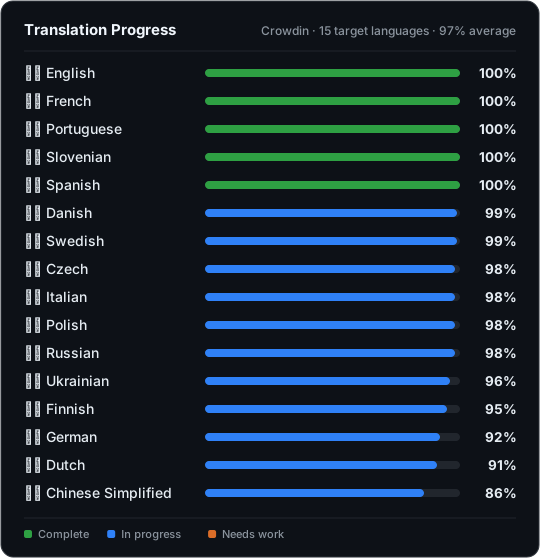
- Multilingual Interface: English, German, Spanish, French, Italian, Dutch, Polish, Brazilian Portuguese, and Slovenian, translated by the community on Crowdin.
- Content Delivery: OPDS support for compatible apps, Send-to-Kindle via email, and browser drag-and-drop uploads.
- Automated Ingestion: Configure a Book Dock drop folder for hands-free importing.
Quick Start (Docker)
mkdir bookorbit && cd bookorbit
mkdir -p books data/app data/postgres
curl -fsSLo .env https://raw.githubusercontent.com/bookorbit/bookorbit/main/.env.example
curl -fsSLo docker-compose.yml https://raw.githubusercontent.com/bookorbit/bookorbit/main/docker-compose.yml
Edit .env and set these required values:
APP_URL=http://your-server-ip:3000   # the URL you'll open in your browser
BOOKS_HOST_PATH=./books              # folder on your server where your book files live

POSTGRES_PASSWORD=         # database password           - openssl rand -hex 24
JWT_SECRET=                # signs login tokens          - openssl rand -hex 32
SETUP_BOOTSTRAP_TOKEN=     # one-time setup wizard token - openssl rand -hex 16
On a NAS, or any host where your book folder is owned by a user other than UID 1000, also set PUID and PGID to match that owner. Run id -u and id -g as the owning user to find them. Getting these wrong is the most common cause of permission errors on first scan.
Optionally set LIBRARY_BROWSE_ROOT=/books to start the library folder picker at /books instead of /.
Then start:
docker compose up -d
Open http://your-server-ip:3000 and complete setup using your SETUP_BOOTSTRAP_TOKEN.
For the full installation guide including reverse proxy setup, file permissions on NAS, external databases, and environment variable reference, see bookorbit.app/installation.
KOReader Plugin
The BookOrbit plugin for KOReader adds progress sync, two-way annotation sync, and a native catalog browser: navigate, search, and download books from your library without leaving the device.

- In BookOrbit, go to Settings > Integrations > KOReader and click Download Plugin.
- Unzip
bookorbit.koplugin.zip. - Copy
bookorbit.koplugintokoreader/plugins/on the device. - Restart KOReader and open a book.
- Use Tools > BookOrbit Sync to connect.
The download is pre-configured with your server URL and credentials, so there is no manual entry on the device. For full setup and sync options, see bookorbit.app/koreader-plugin.
Documentation and Contributing
Full documentation is at bookorbit.app, covering libraries, metadata, readers, Kobo sync, OPDS, users and permissions, OIDC setup, and more.
For local development, see docs/DEVELOPMENT.md. To contribute, see docs/CONTRIBUTING.md for the full workflow: branch naming, test expectations, PR checklist, and commit format.
Translations
Help translate BookOrbit into your language on Crowdin.
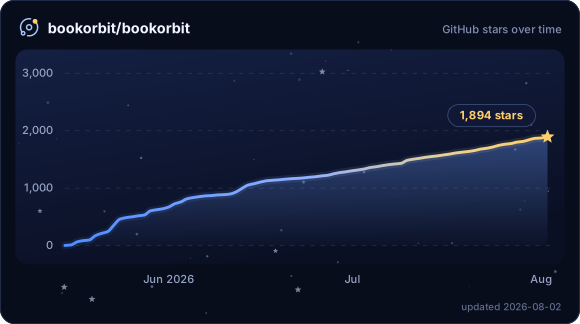
Star History
Support
- Questions and discussion: GitHub Discussions
- Bug reports: GitHub Issues
- Feature requests: GitHub Issues
- Security vulnerabilities: Follow the private reporting process in the Security Policy.
License
BookOrbit is licensed under the GNU Affero General Public License v3.0.